How I Grew 13,000 New Instagram Followers in Under 2 Weeks Using AI Videos (And the Exact Prompts I Used)


Table of Contents
If you've ever created a video for social media, you know the pain.
You shoot the clips. You import them into CapCut or Final Cut or Premiere. You cut, trim, adjust transitions, sync audio, fix color. Even with AI tools that generate individual frames or clips, you still end up stitching everything together manually, matching the first frame to the last, making sure nothing looks janky. A 60-second reel can take hours. Days if you're a perfectionist. And if you're a dentist who'd rather be removing broken screws from inside implants than editing video timelines, it's the kind of work that makes you think: "Maybe I'll just post another carousel."
That was me until late March 2026. And honestly, my Instagram situation was even worse than most.
I run two accounts: @tuminha_dds (personal) and @periospot (the platform). Between running the FOR Foundation, seeing patients, traveling for lectures, and actually having a life with five kids, I had zero time to manage them properly. My personal account had about 17,000 followers, but it was stagnant. No reels, no strategy, no time. Maybe an occasional story here and there, but nothing consistent. The Periospot account was sitting around 5,000, mostly from cross-traffic from the website and newsletter. Neither account was growing because I simply didn't have the bandwidth to create content for them.
Then I found Revid AI, and in under two weeks, everything changed.
The Numbers: What Actually Happened
I'll be specific because vague growth stories are useless. And I'll show you the actual analytics, because that's what I'd want to see.
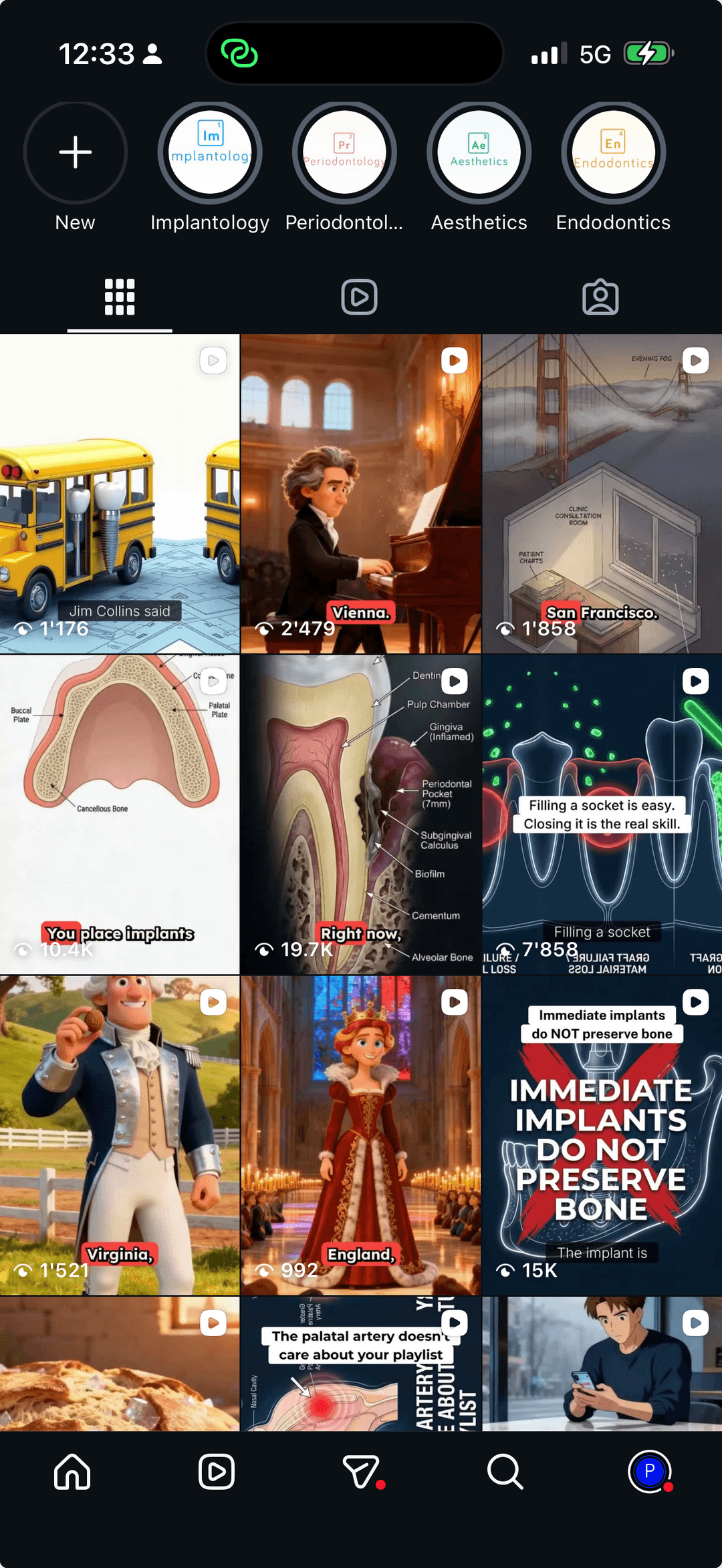
In late March 2026, I started creating AI-generated videos with Revid AI. I made two types: Pixar-style stories (cinematic narratives with emotional arcs) and educational videos (clinical content turned into visual journeys). Both are generation presets built into Revid, and both changed my accounts completely.
Here are the verified numbers from my analytics dashboard (late March to April 12, 2026):
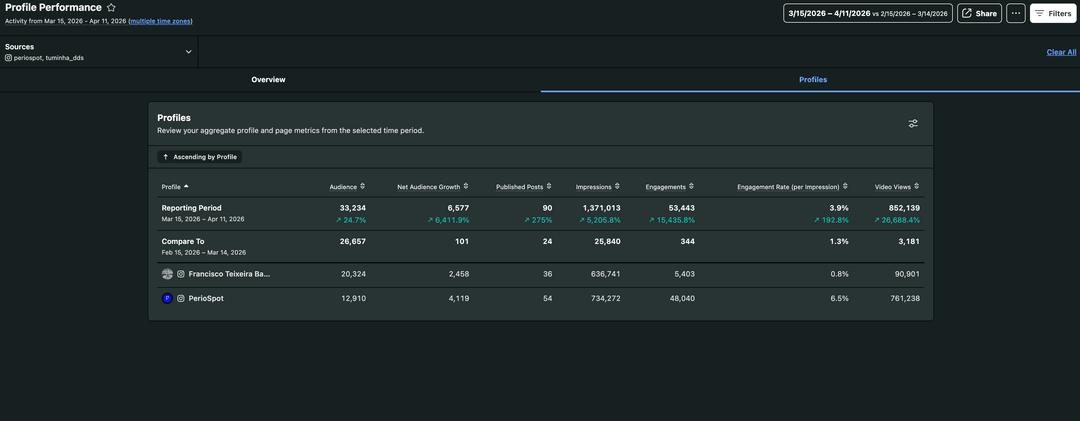
@tuminha_dds (my personal account):
- Grew by approximately 5,000 new followers in under two weeks
- 634,000+ impressions
- 90,000+ video views
- 5,400+ engagements
- Grew by approximately 8,000 new followers in under two weeks
- 734,000+ impressions
- 761,000+ video views
- 48,000+ engagements
Combined across both accounts:
- ~13,000 new followers in under two weeks
- 33,000+ total audience
- 1.37 million impressions
- 852,000 video views
- 53,000+ engagements
- 88 posts published in under two weeks
And here's the number that still doesn't feel real: compared to the period before I started using Revid, impressions went up 15,000%, engagements increased by 130,000%, and video views jumped 135,000%. I'm not adding extra zeros. From 628 video views to 852,000. From 41 engagements to 53,000. In under two weeks.
And these numbers don't even include the last 48 hours, which are still being counted.
A note on other platforms: These numbers are from Instagram, which is where the biggest explosion happened. TikTok, Facebook, and YouTube also saw growth, but much more modest. YouTube is starting to pick up now as the Shorts algorithm catches up. Instagram was the clear winner, and that's where I focused most of my energy with Revid.
Here's the thing nobody tells you about AI video tools: the tool doesn't matter if you don't know what to tell it. The prompt is everything.
And that's what this post is about. Not just "use Revid," but the exact framework, prompts, and workflow I developed to create videos that actually perform.
Why Most AI Videos Look Like Garbage (And What I Did Differently)
Let's be honest. Most AI-generated videos are terrible. Generic stock-footage mashups with robot voices reading ChatGPT summaries. You've seen them. You've scrolled past them.
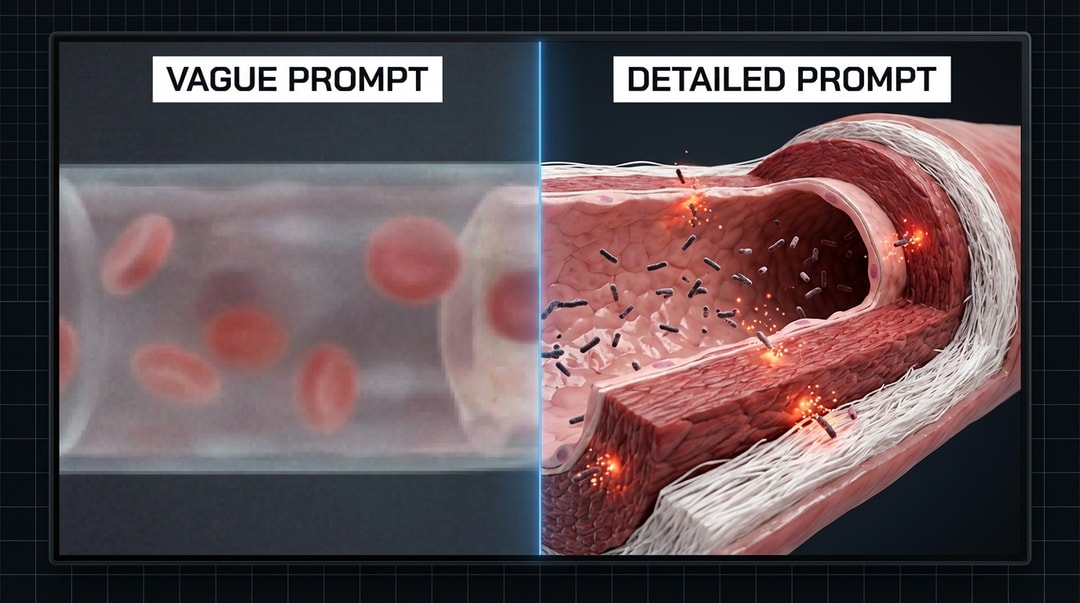
What I realized early is that AI video generators like Revid AI are powerful, but they have a fundamental limitation: they cannot infer what they don't see in the prompt. If you type "show a dental implant," you'll get something vaguely medical-looking. If you type "cross-section of a posterior mandible showing a 4.1mm diameter titanium implant with micro-threaded collar seated 2mm subcrestally, surrounded by trabecular bone with visible osteoblasts lining the implant surface," you get something that actually looks like dentistry.
This insight changed everything for me. And it applies to ANY field, not just dentistry.
My Secret Weapon: I Don't Type
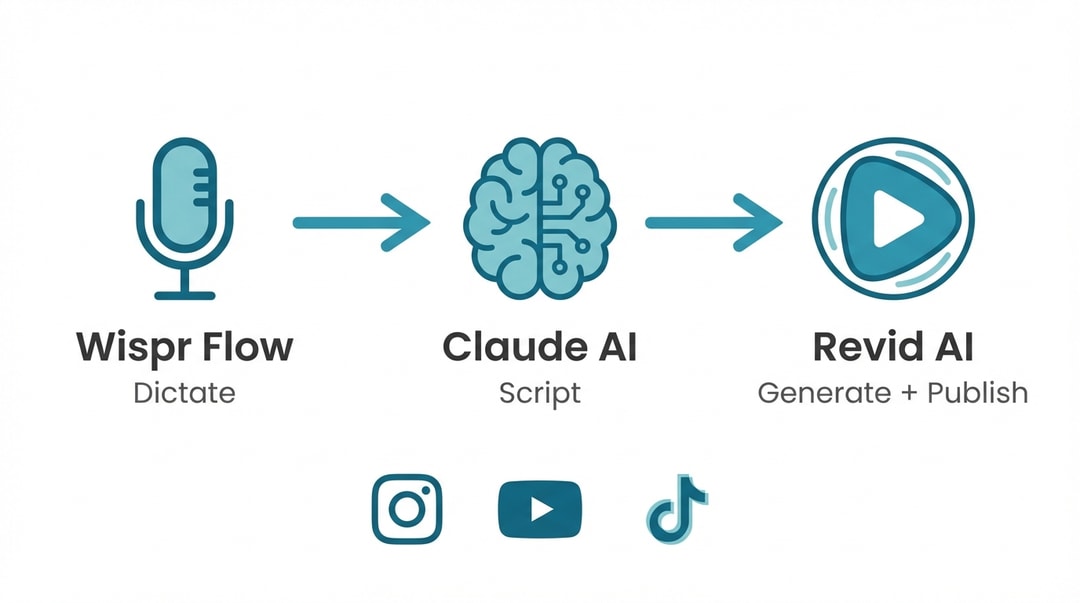
Before we go further, a workflow detail that makes everything faster. I use Wispr Flow to dictate everything. Every script, every prompt, every instruction to Claude. I don't type. I talk. This means I can create a full video script in the time it takes most people to write an email.
I dictate my instructions to Claude AI in Cowork mode, Claude writes the script following a structure I've built over dozens of videos, and then I paste it into Revid. The whole pipeline, from idea to published video, takes about 20 minutes.
The Two Video Formats That Drove All My Growth
Both of these are generation presets inside Revid AI, and each one serves a different purpose.
Format 1: The Pixar Story
Revid has a "Pixar" preset that creates cinematic, story-driven videos. I use this for narratives with emotional arcs. Think: the untold dental story behind a plane crash in the Andes, or why a historical figure's teeth tell a bigger story than any biography.
The Pixar preset gives you that warm, cinematic look with smooth character animations and emotionally engaging pacing. When paired with the right music (I choose something orchestral or story-driven from Revid's music options), these videos stop the scroll because they feel like the opening of a movie, not a dental lecture.
Real example: This Pixar-style story about Professor Branemark, the father of modern implant dentistry, hit almost 60,000 views. The story of how a researcher accidentally discovered that titanium bonds to bone, told as a cinematic narrative:
Watch on Instagram: The Branemark Story
The structure I follow:
- An unexpected hook (something that makes people think "wait, what does THIS have to do with teeth?")
- The story unfolds (real events, historical facts, human drama)
- The dental connection reveals itself (this is the "aha" moment)
- The science (what actually happened biologically)
- The honest truth (caveats, limitations, what we don't know)
- A memorable closing line (one sentence people remember)
Format 2: The Educational Video
Revid's "Educational" preset is designed for clinical or scientific content. I use this for topics like oral-systemic connections, explaining how bacteria from your mouth can travel to your heart, your brain, or affect pregnancy outcomes.
These are visual journeys. The viewer literally travels WITH the bacteria, from the periodontal pocket, into the bloodstream, through the arterial walls, into the target organ. It's intuitive because it's cinematic.
Real example: This educational video about the oral-systemic connection hit almost 350,000 views. A clinical topic that most people would find boring, turned into a visual journey that cardiologists and general practitioners were sharing with their patients:
Watch on Instagram: The Oral-Systemic Connection
The structure:
- Start at the source (the mouth, the periodontal pocket)
- Enter the bloodstream (the journey begins)
- Arrive at the target organ (heart, brain, placenta)
- Show the damage mechanism (how the bacteria actually cause harm)
- Present the evidence (real studies, real numbers)
- The honest truth (caveats, what we don't know yet)
- Resolve with a takeaway (one memorable line)
The "Honest Truth" Is What Sets You Apart
Both formats share one element that I believe drives more shares than any visual quality: the honest truth section.
Every single video I make includes the limitations of the evidence. I always say "associated with" instead of "causes" when causation hasn't been proven. I present the caveats, the failed trials, the confounding factors. Viewers trust this. They come back because they know I won't oversell.
The rule I follow: the weaker the evidence, the longer the honesty section. Strong evidence (bacteria physically found in arterial plaques) gets a brief caveat. Weak evidence (periodontal treatment preventing heart attacks) gets the longest honesty segment.
The Prompting Framework: How I Actually Create These Videos
This is the part most people want. Here's the exact workflow.
Step 1: Start with What You Already Have
Here's something most people don't realize: you don't need to start from scratch. I already have dozens of blog posts on Periospot. When I want to create a video, I tell Claude: "Convert this blog post into a video script." I specify the narration, the duration (for engaging content, aim for one to two minutes), and whether I want a Pixar story or an educational format.
Claude knows my structure, my voice, and my commitment to scientific honesty. It outputs a complete script with clip-by-clip visual descriptions, narration text, and the honest truth section.
If you don't have existing content to convert, you can dictate a topic from scratch. Either way, the key is the next step.
Step 2: Make Your Visual Descriptions Absurdly Detailed
This is the 80/20 of the whole process. AI video models cannot infer anatomy, spatial relationships, or anything you don't explicitly describe. Here's the difference:
Bad prompt: "Show bacteria entering the bloodstream."
Good prompt: "Extreme close-up inside a human coronary artery, 4mm diameter vessel. The arterial wall shows three distinct layers: the thin endothelium (pale pink, single cell layer, cobblestone pattern), the muscular media (darker red, smooth muscle fibers visible), and the adventitia (outer white connective tissue). P. gingivalis bacteria, rod-shaped, 0.5 x 1.5 micrometers, dark reddish-brown pigmented, are penetrating between endothelial cells. Inflammatory markers depicted as orange-red glowing particles (CRP, IL-6, TNF-alpha) cluster around the bacterial invasion site. Warm arterial red color palette."
See the difference? Include cell sizes, colors, layer organization, spatial relationships, and scale references. Without these, you get generic animation. With them, you get something that looks like it came from a medical illustration studio.
This applies to any field. If you're a chef, don't write "show pasta being made." Write "fresh tagliatelle, 8mm wide, pale golden yellow from egg yolks, draped over a wooden dowel drying rack, with visible flour dusting and slight translucency where the dough is thinnest." The specificity IS the quality.
Step 3: Use a Consistent Color Language
This is subtle but powerful. Across all my videos, I use the same color meanings:
- Warm arterial reds: Bloodstream, inflammation, active disease
- Cold blue-purple: Brain tissue, neurological content
- Toxic green-purple: Cancer, tumor microenvironment
- Cool blue-grey: The honesty section (signals: "I'm being transparent now")
- Warm gold: Resolution, hope, the takeaway
Viewers unconsciously learn these associations. When the palette shifts to blue-grey, they know I'm about to tell them what the evidence DOESN'T prove. This builds trust over time.
Step 4: Choose the Right Settings in Revid
Once your script is ready, here's how I set things up in Revid AI. I'm walking you through the actual interface so you can follow along.
Prompt to Video is the option I use (it's the first tab at the top of the creation page). You paste your entire script into the prompt field, and Revid generates the video from it.
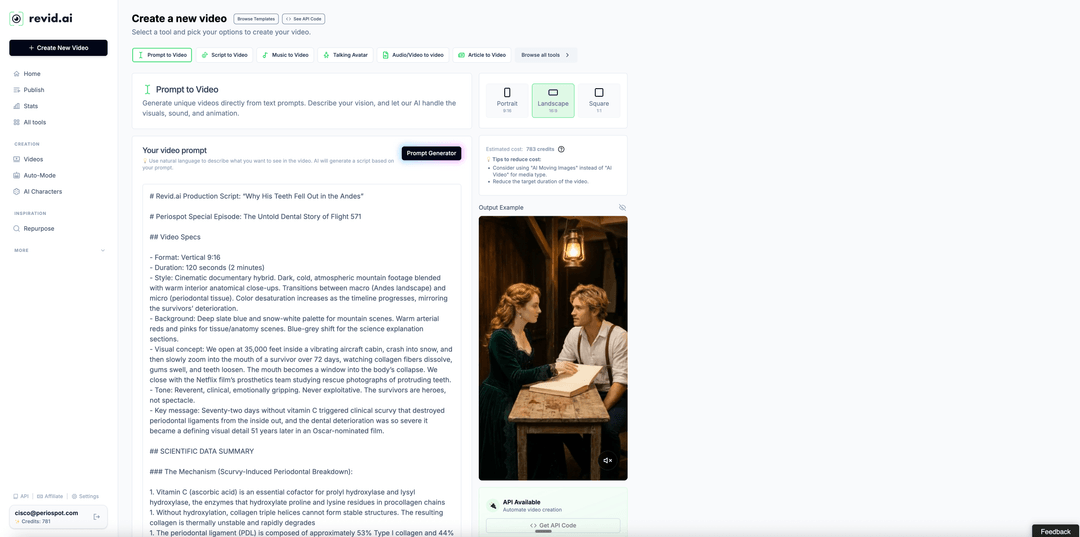
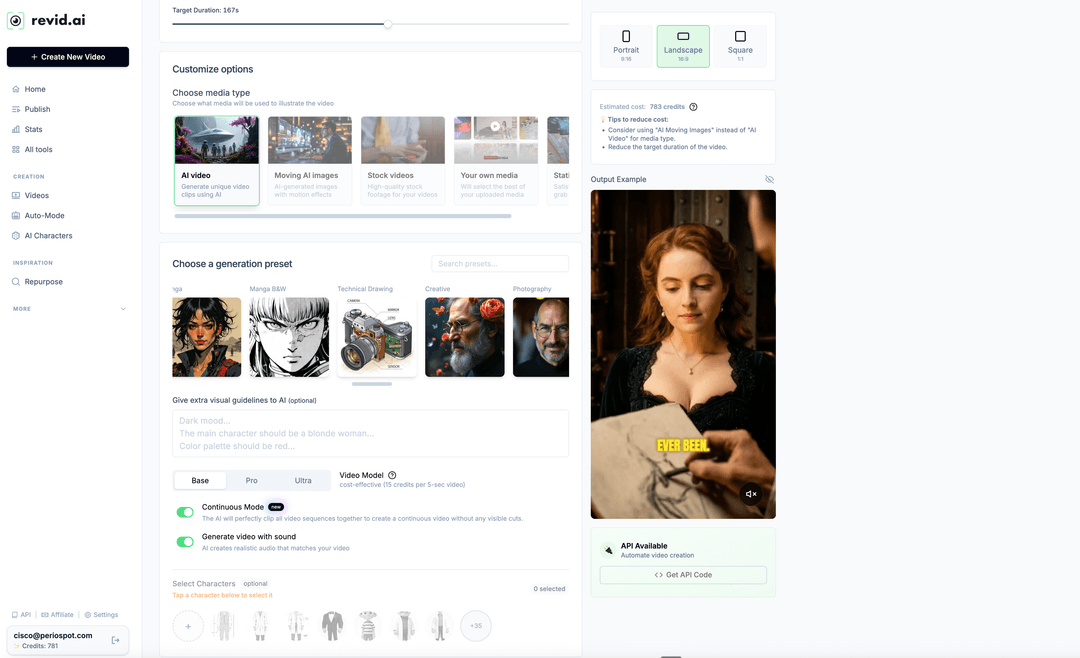
Format: Choose Portrait (9:16) for Instagram Reels and TikTok, Landscape (16:9) for YouTube, or Square (1:1) for specific platforms. You toggle this directly in Revid's interface, no need to specify it in your prompt. If you want, you can tell Claude which platform you're targeting and it will adjust the script accordingly.
Media Type: I primarily use AI Video (fully AI-generated clips) or Moving AI Images (AI-generated images with motion effects). You also have options for stock videos, your own uploaded media, or static images. AI Video gives you the most cinematic results but costs more credits.
Generation Preset: This is where you pick the visual style.
- Pixar for story-driven, cinematic content with warm, emotional visuals
- Educational for clinical and scientific content with clean, informative visuals
- Manga B&W if you want a dramatic black-and-white comic style (I use this occasionally for intense topics)
- There are others (Creative, Photography, Technical Drawing), but Pixar and Educational are my go-to presets
Video Model: Start with Base (cost-effective, 15 credits per 5-second clip). If you love the result and want higher quality, try Pro. Ultra looks incredible but burns through credits fast, so save it for your best scripts. I'd recommend getting comfortable with Base first, and only upgrading when you have a script you really want to nail.
Continuous Mode: Toggle this on. It stitches all clips together into a seamless video without visible cuts. This is relatively new and makes a big difference.
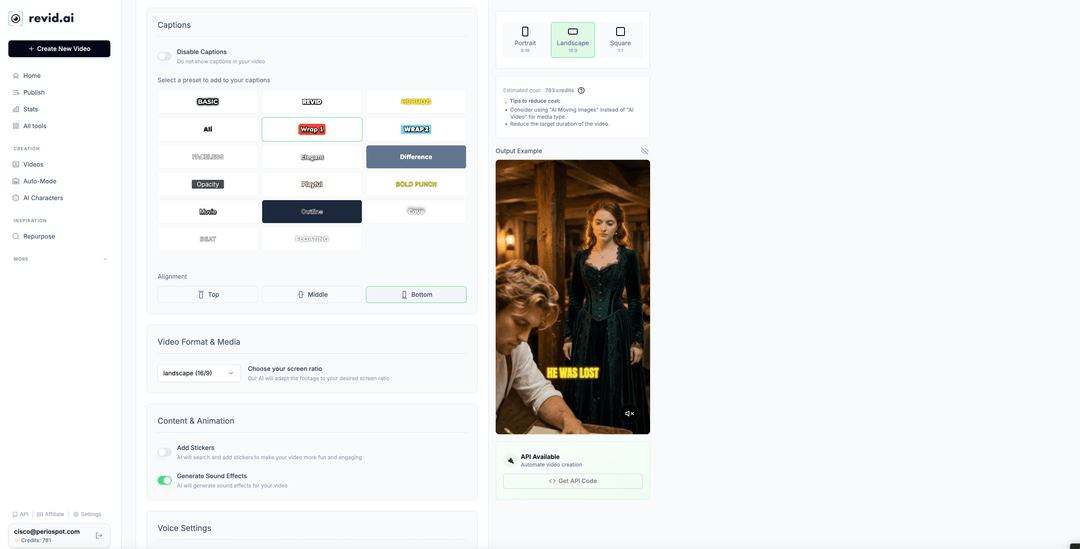
Voice and Captions: Revid generates the voiceover with different voice options. I pick one that matches the tone of the content and set Voice Stability to "Balanced" for a natural feel. For captions, I use presets like "Wrap 1" or "Outline" with bottom alignment. Captions are essential since most people watch on mute.
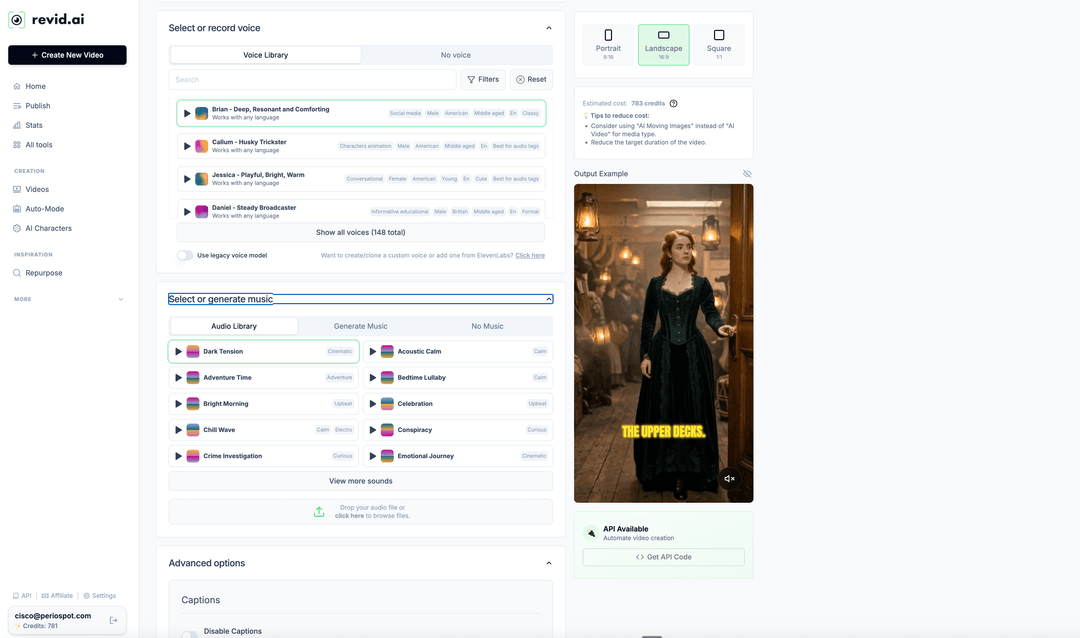
Music: Match the mood. For disease topics or dramatic clinical content, I pick dark, tension-building music. For Pixar stories with lighter or more hopeful narratives, I go with something orchestral and uplifting. Revid has built-in music options, so browse until something fits the emotional arc of your story.
Thumbnails: I don't use a separate tool. I either grab a frame directly from the generated video or, if I need something custom, I generate it with Gemini.
Step 5: Schedule and Publish Directly from Revid
This is one of the features that makes Revid a complete workflow, not just a video generator. Once your video is ready, you can publish or schedule it directly to TikTok, YouTube, and Instagram without ever leaving Revid. You connect your accounts once, and from then on, every video can go straight to your platforms with one click.
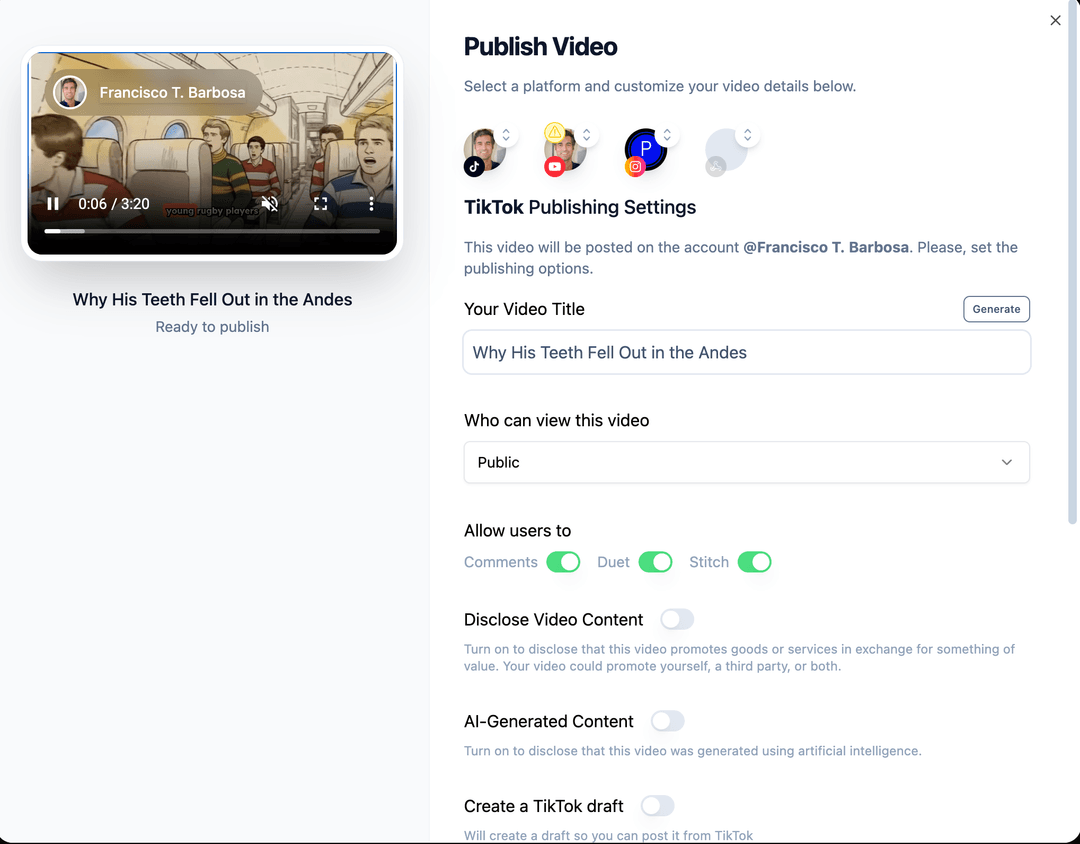
I use this to batch my content. In a single morning, I can generate and schedule almost a full month of videos. I sit down, dictate scripts through Wispr Flow, generate them in Revid, set the publishing schedule, and I'm done. No downloading videos, no uploading to each platform separately, no switching between apps. It all happens inside Revid.
The publishing settings let you customize per platform: video title, visibility, whether to allow comments/duets/stitching on TikTok, and even whether to flag the content as AI-generated. You can publish immediately or create a draft to review later.
This is why I can post 3-4 videos per week across both accounts without it eating my life. The bottleneck is always the script quality, never the production or distribution.
How I Write Scripts with Claude (The AI Writing for AI Video)
Yes, it's AI all the way down. And it works better than anything I've tried.
I use Claude AI in Cowork mode with a custom video script skill that I built. I dictate my instructions through Wispr Flow (so I'm speaking, not typing), and Claude handles the rest.
Here's what my Cowork project looks like. I created a dedicated project for social media growth where all my video scripts, analytics reviews, and content strategy live in one place. Claude has memory and context from every previous session, so it learns my style and gets better with each script:
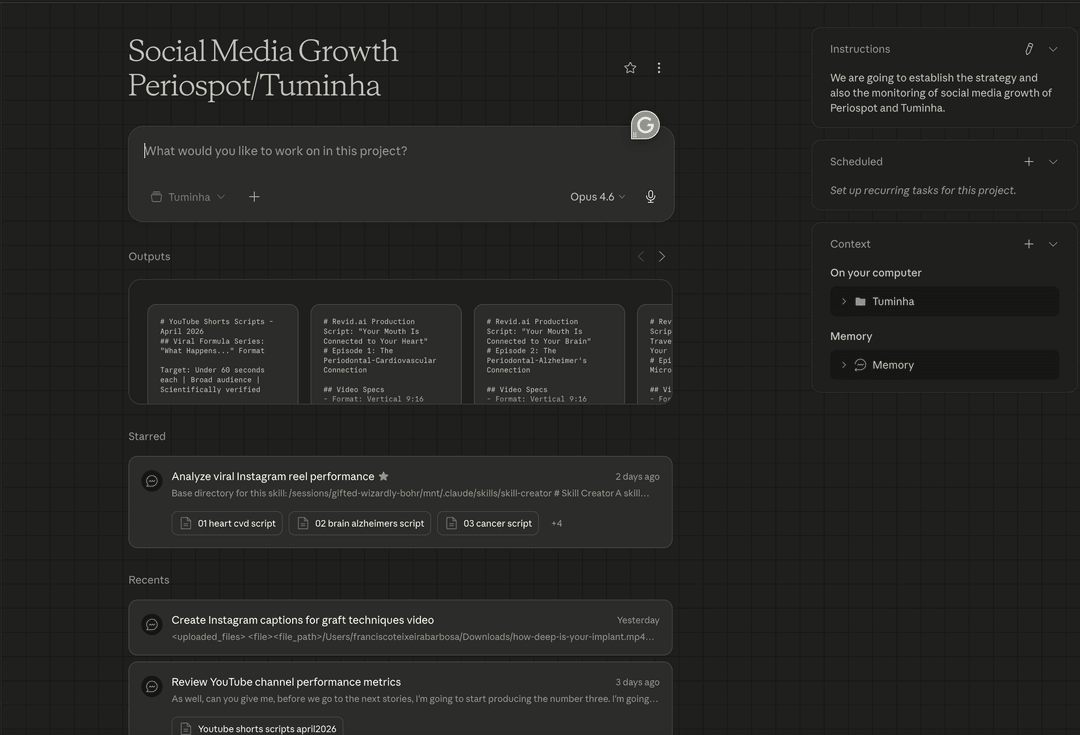
A typical workflow looks like this:
- I pick a topic or an existing blog post from Periospot
- I dictate to Claude: "Convert this blog post into a 90-second educational video script for Revid. Include the honest truth section. Make the narration about 2.5 words per second."
- Claude researches the topic (systematic reviews, meta-analyses, AND criticism and failed trials)
- Claude writes the full script with clip-by-clip visual descriptions, narration, and caveats
- Claude generates platform-specific captions (Instagram, YouTube Shorts, TikTok)
- I review, adjust if needed, paste into Revid, and generate
The custom skill I built for Claude enforces scientific honesty, anatomical detail in every visual description, and consistent structure across all videos. This means every script comes out ready to use, not as a rough draft that needs hours of editing.
Here's what a typical dictation to Claude sounds like:
"Take the Periospot article about the 4 connective tissue harvesting techniques and convert it into a 90-second educational Revid script. Show each technique step by step with detailed tissue layer descriptions. Include the evidence on which technique has the best outcomes and the honest caveats. Duration around 2.5 words per second for natural narration pacing."
That's it. I dictate it in 15 seconds with Wispr Flow, and Claude delivers a production-ready script.
The Complete Toolkit
Here's everything I use:
- Revid AI: The video generation engine. Growth plan at $39/month gives you 2,000 credits and all the features you need.
- Claude AI: For writing scripts with scientific rigor. I use Cowork mode with a custom video script skill that enforces structure and honesty. The project-based workflow means Claude remembers my preferences and gets better over time.
- Wispr Flow: Voice-to-text dictation. I dictate everything instead of typing. It's the reason I can produce 3-4 scripts per week without burning out.
- Gemini: For custom thumbnail generation when I need something beyond a video frame grab.
- Your expertise: The prompts only work because I know the anatomy, the evidence, and the clinical nuances. AI amplifies expertise. It doesn't replace it.
The Honest Truth About My Growth
Here's where I practice what I preach about honesty.
The growth was real. ~5,000 new followers on @tuminha_dds. ~8,000 new followers on @periospot. About 13,000 new followers combined across both accounts. 1.37 million impressions. 852,000 video views. In under two weeks.
But let me be transparent about what contributed:
- Revid AI made production fast enough to be consistent. I published 88 posts in under two weeks. That's the kind of volume that was simply impossible before. When generating a video takes minutes instead of hours, consistency stops being a challenge.
- The content quality came from 20+ years of clinical expertise, not from AI. AI made it visual and fast. But the knowledge behind the prompts is what makes the content valuable.
- The "honest truth" angle resonated because audiences are tired of overselling. This would have worked in any medium. Honesty is the growth hack.
- Timing mattered. AI-generated video content is still novel enough that algorithms boost it. This window won't last forever.
- The numbers are real but still developing. The analytics I shared don't even include the last 48 hours, and the growth is still accelerating.
Would I have gotten the same results with another AI video tool? Maybe. But Revid's workflow, from script to finished video in minutes, with built-in voices, music, captions, and presets, made the consistency possible. And consistency is what drives growth.
The Part Nobody Warns You About: Welcome to the Comment Section
Here's something I wish someone had told me before my videos started getting traction.
When you go viral on Instagram and social media, haters come with the territory. It's not a matter of if, it's when. And the more your content reaches beyond your usual audience, the louder they get.
My personal favorite? The Infinite Torque Bros. I made a video about implant insertion torque, presenting the evidence on why over-torquing in dense bone can be problematic. A whole crew showed up in the comments, absolutely outraged, insisting there is nothing wrong with using infinite torque on hard bone. They weren't just disagreeing. They were writing essays in my comments section. Paragraphs. With exclamation marks.
At first it's annoying. You spend time carefully creating scientifically balanced content, someone watches 30 seconds of it, and then writes a confident rebuttal based on what their mentor told them in 2003. But here's what I learned: the haters actually help your reach. Every angry comment is engagement. Every "debate" in the comments pushes the algorithm to show your video to more people.
My advice: respond politely, cite your sources, and move on. Don't get drawn into endless back-and-forth. And honestly? If nobody is disagreeing with you, your content probably isn't reaching beyond your echo chamber. The Infinite Torque Bros were, in a weird way, a sign that the strategy was working.
Budget some time each week for comment moderation. It's part of the game when you grow fast. Consider it a tax on success.
Your Turn: Start With One Video
You don't need 20 years of clinical experience to use this framework. You need expertise in YOUR field and the willingness to describe things in detail.
Pick a topic you know cold. Something you explain to clients, patients, students, or colleagues every day. Dictate the script (or type it, but try Wispr Flow and you'll never go back). Make the visual descriptions absurdly detailed. Include what the evidence doesn't prove. Post it.
Then do it again next week.
The tools: Revid AI for video generation, Claude for script writing, Wispr Flow for dictation. The framework is in this article. The expertise is yours.
If you found this useful, subscribe to the Periospot newsletter for weekly dental education, AI tools, and the occasional brutally honest take on what the evidence actually says.
Comments
0 totalLoading comments...
Previous
I Gave My AI a Dental Specialization: 3 Free Skills Every Dentist Needs
Next
Healthcare Content Marketing for Dental Brands: A 2026 Playbook
Related Articles

How I Make Dental Carousels With Claude and GPT That People Actually Save
20 min read
Dental Video Marketing in 2026: How to Make Pro Videos Without a Video Editor
8 min read